🎨 UX vs UI Design: What's the Difference? A Beginner's Guide
Have you ever used a website that looked beautiful but was frustrating to navigate? Or an application that was easy to use but looked outdated?
These experiences highlight an important distinction in digital product design: User Experience (UX) and User Interface (UI) design are different, but closely connected.
In this guide, we will explore what UX and UI mean, how they differ, and how they work together to create better digital experiences.
🔍 What Is UX Design?
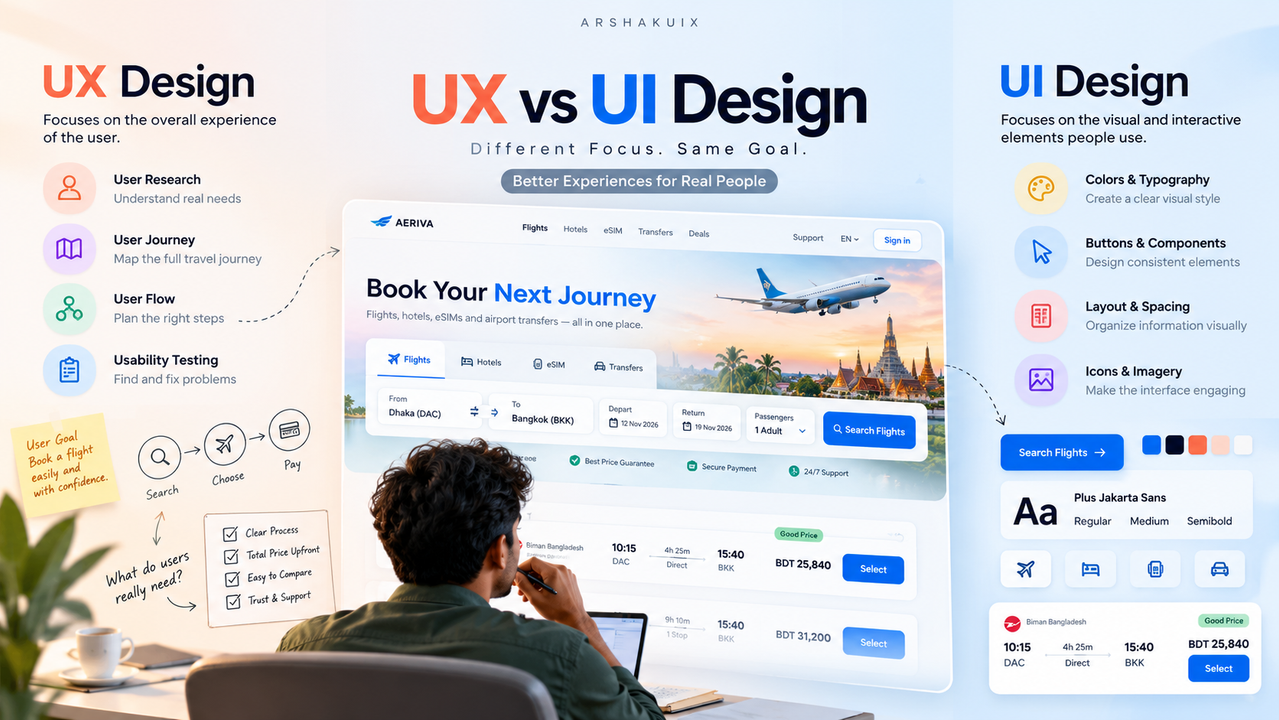
User Experience (UX) design focuses on the overall experience a person has when interacting with a product, service, or system.
The goal is to help users accomplish their objectives effectively, efficiently, and with as little unnecessary friction as possible.
UX designers investigate user needs, identify problems, organize information, design interactions, and evaluate whether a product works for its intended audience.
Common UX design activities include:
- 🔎 User research and interviews
- 👤 User personas and journey mapping
- 🗂️ Information architecture
- 🔀 User flow design
- ✏️ Wireframing and prototyping
- 🧪 Usability testing
- ♿ Accessibility evaluation
✈️ Example of UX Design
Imagine a traveler wants to book a flight from Dhaka to Bangkok.
A UX designer considers how the traveler will search for flights, compare prices, understand baggage allowances, enter passenger information, and complete payment.
If the traveler cannot understand the total price until the final step, the booking experience may create confusion and reduce trust.
The UX designer investigates the problem and looks for ways to make pricing clearer, reduce unnecessary steps, and help users make informed decisions.
💭 The main UX question is: Can users accomplish their goals effectively and confidently?
🖌️ What Is UI Design?
User Interface (UI) design focuses on the visual and interactive elements people use to interact with a digital product.
UI designers organize information visually and create consistent interface elements that make a product understandable and usable.
Common UI design activities include:
- 🔤 Typography and visual hierarchy
- 🎨 Color selection and contrast
- 📐 Layout, spacing, and alignment
- 🔘 Buttons, forms, and input fields
- 🖼️ Icons and illustrations
- 🧩 Component libraries and design systems
- 📱 Interactive states and responsive layouts
✈️ Example of UI Design
On the same flight-booking website, a UI designer determines how the search form looks and behaves visually.
They choose readable typography, establish clear field labels, make the primary action easy to identify, and organize flight prices and departure times so users can scan the results quickly.
A well-designed interface helps users understand what information matters and what action they can take next.
💭 The main UI question is: Is the interface clear, consistent, accessible, and easy to interact with?
⚖️ UX vs UI Design: Key Differences
| Aspect | UX Design | UI Design | | Primary focus | Overall user experience | Interface presentation and interaction | | Main objective | Help users achieve their goals | Make information and controls clear | | Typical activities | Research, journey mapping, user flows, testing | Visual design, components, typography, styling | | Common deliverables | Research findings, wireframes, flows, prototypes | Interface screens, components, design systems | | Evaluation | Task completion, usability, user feedback | Visual clarity, consistency, accessibility |
UX and UI are not completely separate disciplines. UI decisions affect usability, and UX decisions influence the structure and behavior of the interface.
🤝 How UX and UI Work Together
Consider a flight-booking application with a complicated search process.
The UX designer identifies that users struggle to compare flight options because essential information is difficult to find.
The UI designer helps present that information through a clearer layout, stronger visual hierarchy, consistent typography, and more understandable controls.
The process might look like this:
- Research: Discover where users experience difficulty.
- Define: Identify the underlying problem.
- Structure: Improve the information architecture and user flow.
- Design: Create an interface that communicates information clearly.
- Test: Observe users interacting with the proposed solution.
- Improve: Refine the experience based on findings.
Neither attractive visuals nor a logical process alone guarantees success. Effective products require both a usable experience and a well-designed interface.
✈️ A Practical Example: Improving a Flight Search Form
Imagine a flight-search form containing departure and destination fields, travel dates, passenger selection, and a search button.
🔍 UX improvements
- ✅ Use clear field labels and logical input order.
- ✅ Prevent invalid departure and return dates.
- ✅ Explain required information before users submit the form.
- ✅ Preserve entered information when an error occurs.
- ✅ Help users understand the next step after searching.
🎨 UI improvements
- ✅ Use consistent spacing and alignment.
- ✅ Make the search action visually prominent.
- ✅ Distinguish labels from entered values.
- ✅ Provide clear focus, loading, disabled, and error states.
- ✅ Ensure text and controls have sufficient contrast.
Together, these improvements can make the booking process easier to understand and complete.
The important principle is to design around actual user needs rather than making visual changes without understanding the problem.
👤 Can One Designer Do Both UX and UI?
Yes. Many product designers work across both disciplines, especially in smaller teams and startups.
A designer may conduct research, map user flows, build wireframes, create polished interfaces, develop reusable components, and test prototypes.
However, being able to do both does not mean that the two skill sets are identical.
UX requires strong problem-solving, research, interaction design, and evaluation skills. UI requires visual communication, layout, typography, consistency, and detailed interface execution.
Developing both skill sets helps designers make better product decisions.
🚀 How to Start Learning UX and UI Design
If you are a beginner, follow a structured learning process.
Step 1: Learn UX fundamentals. Understand user needs, usability, information architecture, and interaction design.
Step 2: Study existing products. Examine websites and applications to identify what helps or prevents users from completing tasks.
Step 3: Practice interface design. Use a tool such as Figma to explore layout, typography, spacing, components, and responsive design.
Step 4: Build interactive prototypes. Connect screens and simulate realistic user journeys.
Step 5: Test your designs. Ask people to complete specific tasks and observe where they encounter difficulties.
Step 6: Document your decisions. Explain the problem, your design process, the evidence behind your decisions, and what you would improve next.
A strong portfolio demonstrates not only the final interface but also how you identified and solved the underlying problem.
💡 Final Thoughts
UX and UI design serve different purposes, but they work toward the same goal: creating digital products that help people accomplish what they need to do.
UX focuses on the broader experience, including research, structure, usability, and the user's journey. UI focuses on the interface's visual presentation and interactive elements.
As you develop your design skills, avoid treating UX as research alone or UI as decoration alone. Both require deliberate decisions, attention to detail, and an understanding of how people use products.
✨ The key takeaway: Good UX helps people accomplish their goals. Good UI helps people understand and interact with the product. Great digital products bring both together.
📚 References and Further Reading
- Nielsen Norman Group: User Experience (UX) Basics
- Interaction Design Foundation: What Is User Interface (UI) Design?
- Laws of UX: Psychology and Principles for Better Design