

Miller's Law: Chunking for Working Memory
A practical guide to designing around the limits of working memory, so users remember more and struggle less.
Think about the last time someone read you a phone number while you were fumbling for your phone. As one flat stream of eleven digits, you probably lost the middle before you typed anything. In groups, 0177, then 363, then 9170, you probably got it right on the first try. The digits did not change. Only the grouping did. That difference is Miller's Law at work, and it is one of the most practical ideas in UX design.
In 1956, cognitive psychologist George Miller published a paper with one of psychology's most quoted titles: "The Magical Number Seven, Plus or Minus Two." He found that people can hold about seven items in short-term memory at once. The deeper finding was about the unit of memory. The limit is not seven digits or letters. It is seven chunks, where a chunk is the largest meaningful unit a person recognises. A chunk can be a digit, a word, or an idea, depending on what the person already knows. So the capacity of memory is not seven pieces of data. It is about seven meaningful groups, each carrying far more information than it appears to.
The UX version of this idea is Miller's Law: the average person can only keep about seven items in working memory, so organise content into smaller, meaningful chunks. When you chunk well, users process, understand, and remember more, without the interface asking anything extra from them.
In short: working memory holds only a few items, and each item is a meaningful chunk, not a raw fact. Group information the way users already think, label the groups clearly, and interfaces get dramatically easier to scan, compare, and remember.
The Law in Plain Words
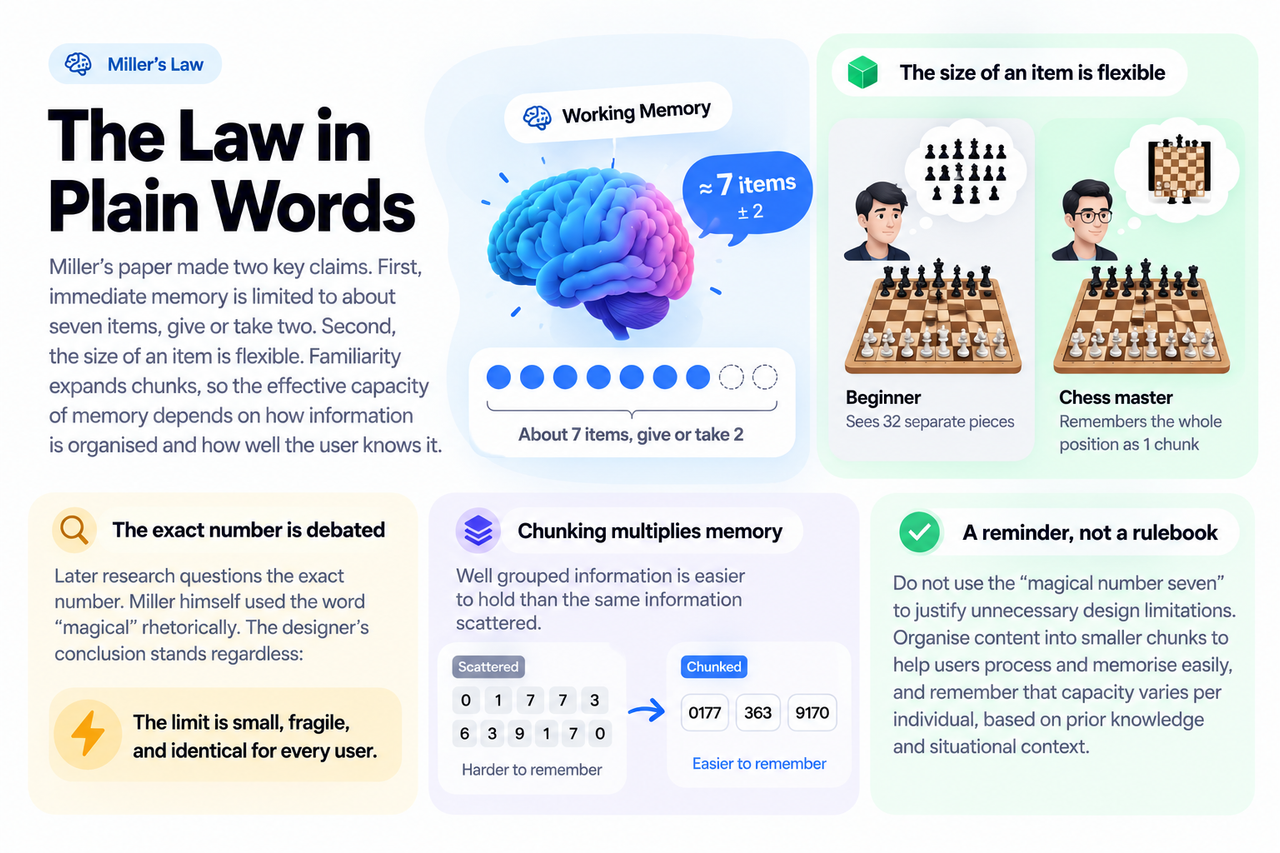
Miller's paper made two claims that matter to designers. First, immediate memory is limited to about seven items, give or take two. Second, the size of an item is flexible. A chess master remembers a whole board position as one chunk; a beginner sees thirty-two separate pieces. Familiarity expands chunks, so the effective capacity of memory depends on how information is organised and how well the user knows it.
Later research questions the exact number. Miller himself used the word "magical" rhetorically, and the designer's conclusion stands regardless: the limit is small, fragile, and identical for every user. Two honest readings matter for daily work. Chunking multiplies memory: well grouped information is easier to hold than the same information scattered. And the number is a reminder, not a rulebook. The Laws of UX project puts it plainly: do not use the "magical number seven" to justify unnecessary design limitations. Organise content into smaller chunks to help users process and memorise easily, and remember that capacity varies per individual, based on prior knowledge and situational context.
Why Designers Should Care
Your users are not paying attention to your product. They glance at it between messages, in bad light, with half their mind elsewhere. Their working memory is already busy with their own lives. Every time your interface asks them to hold something in mind, a confirmation code from another app, the price shown two screens ago, the plan they picked, it spends one of their few available slots. When those slots fill up, users slow down, make mistakes, or leave. Working memory also leaks fast: items fade in roughly twenty seconds unless refreshed, so tasks that stretch across many screens are racing a clock the user cannot see.
There is one crucial nuance that saves designers from a famous misapplication. Memory limits do not mean every list must be short. A long navigation menu works fine, because users scan it and recognise what they want; they never memorise the whole list. Nielsen Norman Group explicitly calls the seven-item menu limit a misconception. The memory limit bites when the interface demands recall: comparing options across separate pages, carrying data between form steps, or reconstructing a vanished error message. Recognition is cheap. Recall is expensive. Good design pushes everything it can toward recognition.
Remember: the question is never "how much can I show" but "how much must the user remember." Every fact you keep visible on screen is one the user's memory does not have to carry. Design so that remembering is optional, not required.
Chunking: The Designer's Main Tool
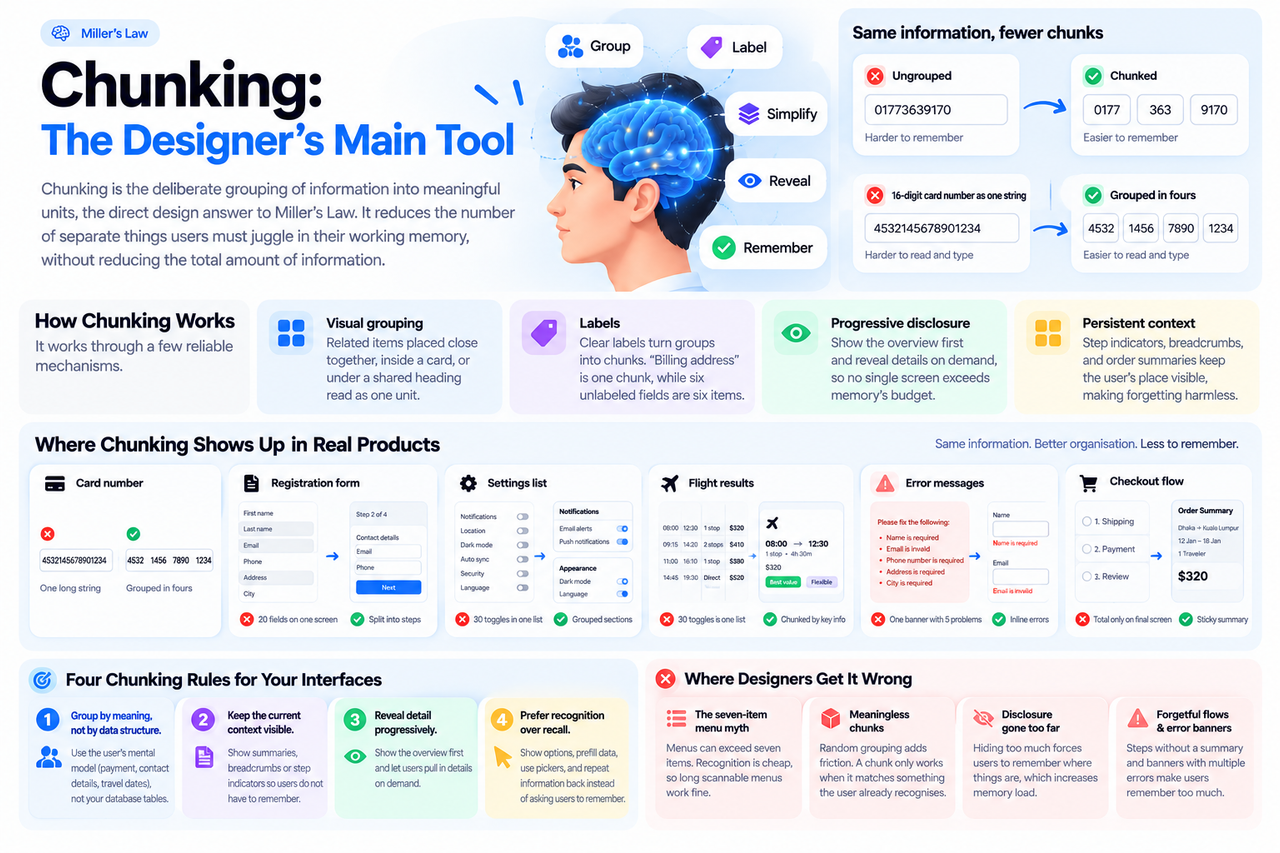
Chunking is the deliberate grouping of information into meaningful units, the direct design answer to Miller's Law. Phone numbers, credit card fields grouped in fours, and long processes split into labeled steps all work the same way. None of them reduce the total amount of information. They reduce the number of separate things the user must juggle at once.
It works through a few reliable mechanisms. Visual grouping is the strongest: related items placed close together, inside a card, or under a shared heading read as one unit before the user consciously decides to read them, with the principle of proximity doing memory's job. Labels turn groups into chunks: "Billing address" is one chunk, while six unlabeled fields are six separate items. Progressive disclosure manages chunking across time: show the overview first and reveal details on demand, so no single screen exceeds memory's budget. And persistent context protects memory across screens: step indicators, breadcrumbs, and order summaries keep the user's place visible, making forgetting harmless.
Where Chunking Shows Up in Real Products
| Common problem | Chunking fix |
|---|---|
| A 16-digit card number shown as one string | Display and enter it in groups of four, matching how people read numbers |
| A 20-field registration form on one screen | Split it into labeled steps with a progress indicator and a visible summary |
| Thirty settings toggles in one flat list | Group them into headed sections of three to six related items each |
| Flight results as one wall of numbers | Group each result by the chunks users compare: time, stops, price, duration |
| One error banner listing five problems | Show each error inline next to its field, so nothing must be remembered |
| Checkout total shown only on the final screen | Keep a sticky order summary visible through every step of the flow |
Four Chunking Rules for Your Interfaces
1. Group by meaning, not by data structure. Users think in terms like payment, contact details, and travel dates. They do not think in your database tables. Every chunk boundary should match a boundary the user already recognises. When grouping follows the user's mental model, each group becomes one chunk. When it follows the system's internal structure, it stays a pile of separate facts.
2. Keep the current context visible. Anything the user might need to remember across steps should instead stay on screen: a summary panel, a breadcrumb trail, a "step 2 of 4" indicator, the item already in the cart. Visible context is cheap insurance against forgetting. A multi-step form with a persistent summary can be as long as it needs to be; the same form without one fails because it taxes memory at every step.
3. Reveal detail progressively. Show the overview first and let users pull in details on demand. A pricing page leads with three plans, not thirty features. A dashboard leads with headline numbers, with drill-downs one click away. But balance matters: hiding too much forces users to hold a mental map of where things are, which spends memory instead of saving it.
4. Prefer recognition over recall. Wherever possible, show options instead of asking users to remember them. Prefill what you know, offer pickers instead of blank fields, repeat entered data back instead of asking for it twice. This pairs naturally with the menu insight: recognition is the cheaper operation, so spend the screen space and save the memory.
Where Designers Get It Wrong
- The seven-item menu myth. The most common misuse of Miller's Law is declaring that menus or lists must never exceed seven items. Because menus rely on recognition, not memory, long scannable menus work perfectly well. Cut a useful option to satisfy a number, and you have made the product worse in the name of a law you misunderstood.
- Meaningless chunks. Splitting an address into six unlabeled fields, or a phone number into random groups, adds friction instead of removing it. A chunk only works when it matches something the user already treats as one thing.
- Disclosure gone too far. Progressive disclosure is a tool, not a religion. When users must open three accordions to understand one screen, the design has traded visual simplicity for memory load, which is the worse trade.
- Forgetful multi-step flows. Splitting a long form into steps without a visible summary means each step starts from a blank mind. The steps are chunks; the missing summary is the memory leak.
- Error messages that demand memory. A banner listing five problems at the top of a long form asks the user to remember the list while scrolling to fix each one. Inline errors next to each field cost nothing to remember.
Key Takeaways
- ✓ Working memory holds about seven items, and each item is a chunk, meaning the largest unit the user recognises as one thing.
- ✓ Chunking multiplies memory: group by meaning, label the groups, and keep each group small enough to grasp at a glance.
- ✓ Menus can be long because scanning is recognition, not recall. The limit hits when the design forces users to remember.
- ✓ Visible context, such as summaries, breadcrumbs, and step indicators, makes forgetting harmless.
- ✓ Never use the number seven to justify cutting useful options. It is a reminder to organise information, not to delete it.
Conclusion
Miller's Law is not really about the number seven. It is about respect for a scarce resource. Your users bring a small, leaky working memory to every screen you design, and most of it is already spent on their own lives. Chunking is how you fit your product into what remains: group by meaning, label clearly, keep context visible, and let recognition do the heavy lifting.
The next time you face a dense screen, do not start by deleting. Start by grouping. Ask what the natural chunks are, the way a phone number has its natural groups, and let the structure do the remembering for the user. That one habit will make more of your interfaces feel effortless than any visual trick you could learn this year.
References and Further Reading
- Miller's Law, Laws of UX
- Short-Term Memory and Web Usability, Nielsen Norman Group
- The Magical Number Seven, Plus or Minus Two, Wikipedia

Written by
Md Arshak Hossain Zahid
UI/UX Designer · Founder of ArshakUIX
Practical insights on UX laws, usability, design systems, and product design.